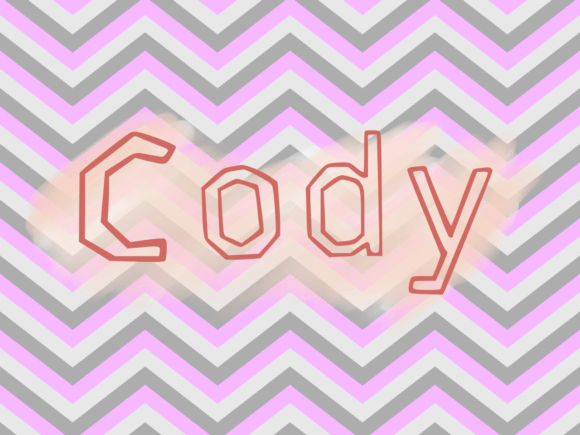
Cody: A Handwritten Script Font That Elevates Craft and Product Design
As a small shop owner who creates printable SVG designs and physical products for weddings, home decor, and seasonal crafts, I’ve tried dozens of script fonts over the years. Cody stands out not just for its elegant flow and natural handwritten charm, but also for how well it translates across product types—from greeting cards to boutique tags, wall art to packaging labels. It’s a Script Amp font that feels personal, yet polished enough for commercial use.
What makes Cody special is its versatility. It doesn’t lean too casual or overly formal, which is rare in a handwritten-style font. The strokes have a soft bounce, and the letterforms maintain a consistent rhythm that makes them easy to read even at small sizes. This is a big deal when you're designing stickers, tags, or digital printables that need to be legible on both screen and print. Whether you're creating a custom name tag for a handmade candle or a welcome sign for a rustic wedding, Cody brings a touch of warmth without sacrificing clarity.
From Invitations to Packaging: Real-World Uses for Cody
One of the first projects I used Cody for was a set of wedding invitations. I needed a font that felt romantic and personal, but still professional enough to be printed on premium cardstock. Cody delivered. I paired it with a clean serif font for the body text, and the contrast worked beautifully. The bride loved how the handwritten feel made the invitation feel more intimate, like it was written just for her guests.
Since then, I’ve used Cody across a variety of product lines. Here are a few examples:
- Boutique product tags – The font’s legibility at small sizes makes it ideal for clothing tags and jewelry labels.
- Seasonal greeting cards – Whether it’s “Merry Christmas” on a holiday card or “Happy Birthday” on a gift tag, Cody adds a hand-lettered touch without looking messy.
- Wall art prints – The flowing style works well for quotes and inspirational sayings that need to feel warm and inviting.
- Digital planner pages – Titles and headers in Cody help guide the eye without overwhelming minimalist layouts.
- Wedding signage – From escort cards to seating charts, the font’s elegance shines in formal settings.
Designing with Cody: Readability and Production Tips
If you're using Cody with a Cricut or Silhouette cutting machine, keep in mind that intricate script fonts can sometimes cause issues with small letter spacing. I recommend adjusting the letter spacing slightly in your design software to avoid overlapping cuts, especially when working with vinyl or delicate materials. For stickers and tags, a font size of 12pt or higher usually ensures readability while maintaining the font’s character.
When printing on physical cards or packaging, always test the font at your intended size. Cody holds up well on most home printers, but if you're sending files to a professional print shop, make sure to include the font file or outline the text to prevent substitution issues. And if you're designing digital mockups for product previews, Cody’s natural texture and flow help your designs look more authentic and handcrafted.
Font Pairing Ideas That Work with Cody
Part of what makes Cody so useful is how well it pairs with other fonts. Because it has a slight whimsy but remains grounded in readability, it plays nicely with both serif and sans serif styles. Here are a few combinations I’ve used successfully:
- Cody + Montserrat – A modern sans serif that contrasts Cody’s script style while keeping the overall look clean and contemporary.
- Cody + Playfair Display – For a more elegant, traditional feel, especially in wedding and event designs.
- Cody + Lato – A soft, approachable sans serif that works well for body text when Cody is used for headlines or titles.
- Cody + Roboto – A simple, neutral font that helps Cody stand out without competing for attention.
These pairings help maintain visual hierarchy while ensuring your message remains clear and easy to read. When designing product packaging or invitation suites, using a secondary font like one of these can elevate the overall design and improve the user experience.
What You Get with Cody: Styles, Alternates, and File Formats
One of the things I appreciate most about Cody is the attention to detail in the font package. It includes multiple stylistic alternates and ligatures that let you customize the look of words for logos, quotes, or decorative headers. This flexibility helps avoid repetition in product lines, especially when creating variations of the same design for different customers.
The font also supports a wide range of languages, which is a big plus if you sell your products internationally or create multilingual designs. And with support for common file formats like OTF, TTF, and WOFF, Cody is compatible with most design tools—whether you're using Adobe Illustrator, Canva, or a Silhouette software suite.
Commercial Licensing: A Must for Sellers and Designers
As a small business owner who sells digital downloads, SVG cut files, and physical products, I can’t stress enough how important it is to use fonts with proper commercial licensing. Cody comes with a clear commercial use license that allows you to incorporate the font into both digital and physical products you sell, as long as you’re not reselling the font file itself. This gives me peace of mind when bundling designs for Etsy or offering custom SVGs for client projects.
Always double-check the licensing terms included with the font download. If you're using Cody in client work or creating templates for platforms like Canva or Creative Market, make sure the license covers those use cases. Most font creators are generous with commercial permissions, but it’s always better to confirm before launching a product.